Photoroom Alternative: I Compared 3 Tools for Sellers

I used Photoroom to make white-background photos for a full season of tote bags, more than 40 SKUs in all. I loaded all the photos into Batch Edit at once and finished the set in a little over ten minutes. Back then the subscription felt like money well spent. This spring, when I wanted a 15-second video for each style, I checked the pricing page and found I would need to upgrade from Pro to Max. The right Photoroom alternative depends on why you want to switch. You might want a lower subscription price, need only background removal, or want to make video ads in the same tool.
I compared four tools using the steps I follow to list new products. I used Photoroom as the baseline to see which jobs Pixelcut, Claid.ai and LubanAI (an AI toolkit for online sellers and creators) were best suited to. Competitor features and plans come from each company's website as of November 2026. Prices change, so check the official site again before you buy.
The short answer
| If you want… | Better fit |
|---|---|
| Quick cutouts and white-background images on your phone, shared by a small team | Pixelcut |
| White-background images, AI product photos and video ads in one subscription, plus a Shopify connection | Photoroom (Max and up) |
| Pay-per-operation AI photoshoots and an API to plug into your own system | Claid.ai |
| One SKU taken from white-background image to video ad, paid per job in credits, with no monthly plan up front | LubanAI |
What Photoroom offers today
Photoroom's homepage headline is "Sell at first sight," and the tool list is long: Background Remover, AI Shadow, Recolor, Product Staging, Instant Resize, Batch Edit, AI Product Photography, Video Ad Maker (AI characters, music and voiceover, exported in Meta, TikTok and YouTube formats), plus Marketplace Sync and an Image API. It runs on the web, iOS and Android.
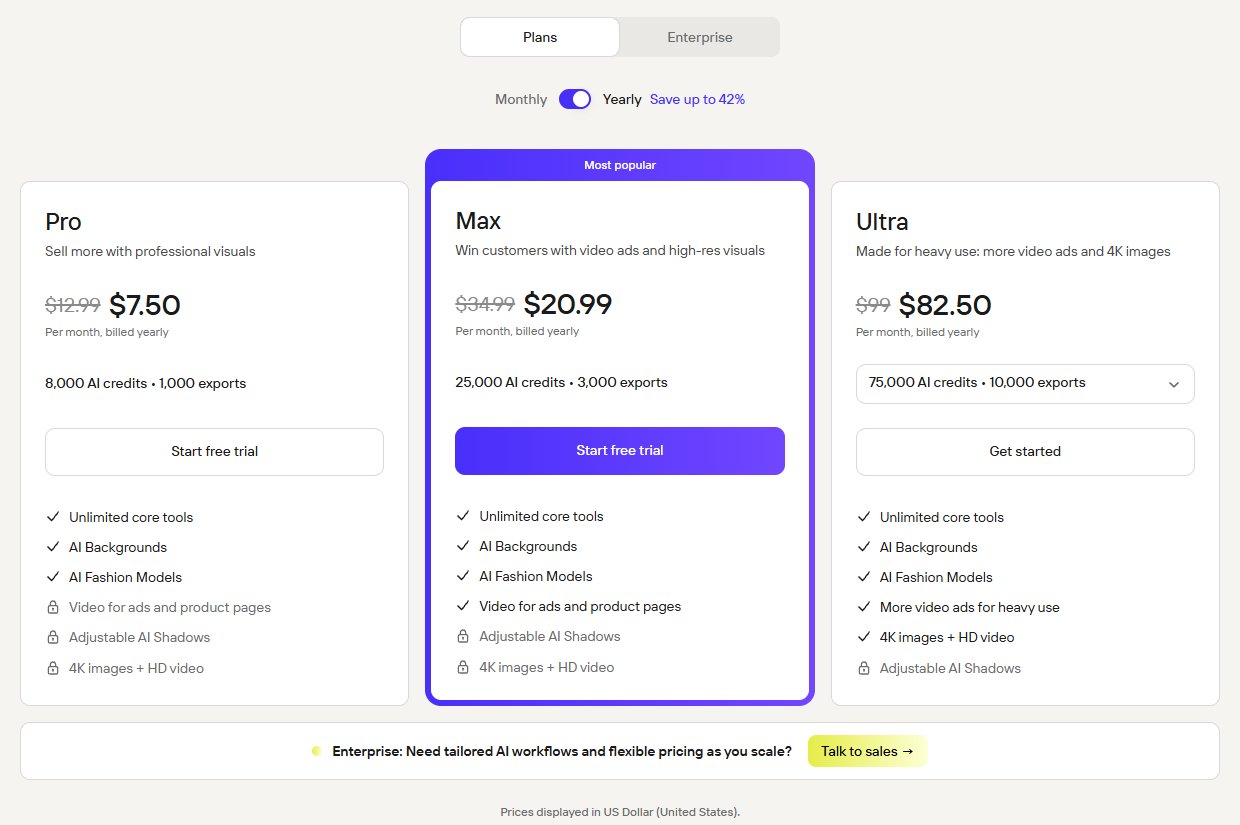
I picked the differences that matter most when a seller chooses a plan and put the four plans on the pricing page side by side: Pro, Max (marked Most popular), Ultra and Enterprise (Custom).
| Plan | AI credits / month | Exports / month | Video | Shopify integration |
|---|---|---|---|---|
| Pro | 8,000 | 1,000 | Not included | Not included |
| Max | 25,000 | 3,000 | Included, up to 50 generations | Included |
| Ultra | 75,000 | 10,000 | Included, 150 generations, plus 4K images and HD video | Included |
| Enterprise | Custom | Custom | Custom | Custom |
Pro includes the core tools, AI Backgrounds and AI Fashion Models. That covers background removal, background changes and product shots with models. But video ads and the Shopify integration both start at Max, and that is exactly where I got stuck. In US dollars, Pro is $12.99 a month, Max $34.99 and Ultra $99. Billed yearly, they come to $7.50, $20.99 and $82.50 a month, and the page says "Save up to 42%." Prices can differ by region, so check the pricing page for yours. The API is billed separately under Basic, Plus and Enterprise, apart from the web subscription.
Is Photoroom free? There is a free plan. According to the help center, the Free plan is for personal, non-commercial use only. It has limited features and lower limits on AI credits and exports. The Pro and Max annual plans also offer a 7-day free trial. If you buy Pro, Max or Ultra and are not happy, you can request a refund within 7 days of your most recent payment.
To be fair to Photoroom: if you only work with still images and have relatively few SKUs, it is hard to use up Pro's 8,000 credits and 1,000 exports, and I never found fault with its background removal. If you do leave, it is most likely because video is your next step or because you keep hitting the monthly export cap.
3 tools to consider when choosing a Photoroom alternative
1. Pixelcut
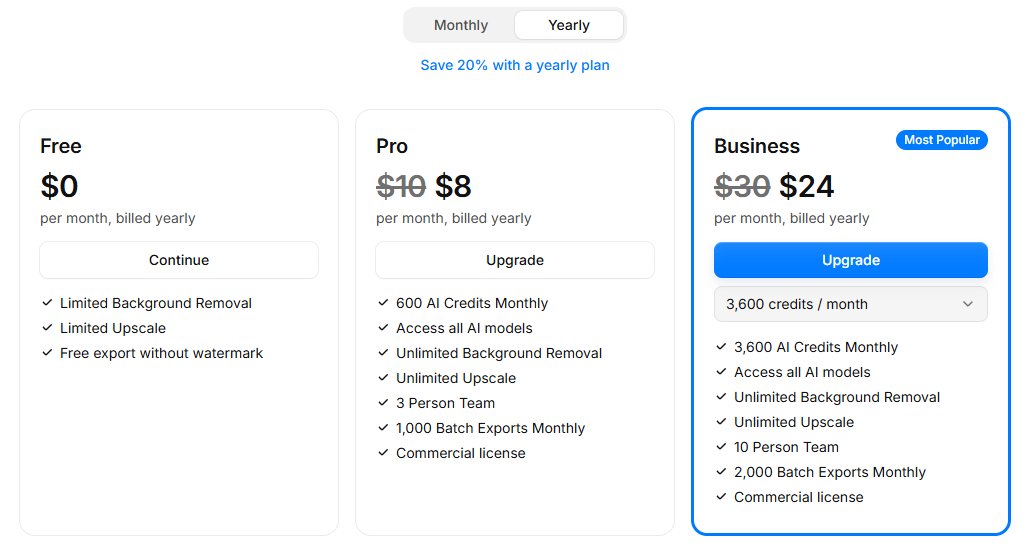
Of the tools I compared, Pixelcut felt the most like Photoroom. It also came up most often when I searched for "Photoroom alternative." The pricing page has three plans. Free costs $0, with limited uses of Background Removal and Upscale, and the page states that free exports carry no watermark. Pro is $10 a month, or $8/month billed annually, with 600 AI credits, unlimited background removal and upscaling, 1,000 batch exports a month, a 3-person team and a commercial license. Business is $30 a month, or $24/month billed annually, with 3,600 credits, a 10-person team and 2,000 batch exports a month.
Pixelcut's credits go mostly to third-party models. Image models include Nano Banana 2.1, GPT Image 2 and Seedream; video models include Kling, Veo 3.1 and Seedance. The pricing page uses 5-second clips to show how many videos the credits cover for each model. There are iPhone and Android apps, it works in a desktop browser, and an API is available.
Pixelcut suits small teams that work together and need to remove backgrounds from a lot of product photos. Unlimited background removal is useful for stores that list new products every week. For video ads, you choose the video model and write the prompt yourself.
2. Claid.ai
Claid.ai positions itself as an AI product photography suite, and its web tools charge credits per operation. The free trial gives 50 credits, plus 50 API credits. Paid plans are Essentials, Pro and Business (Custom). Check the pricing page for current plan rates.
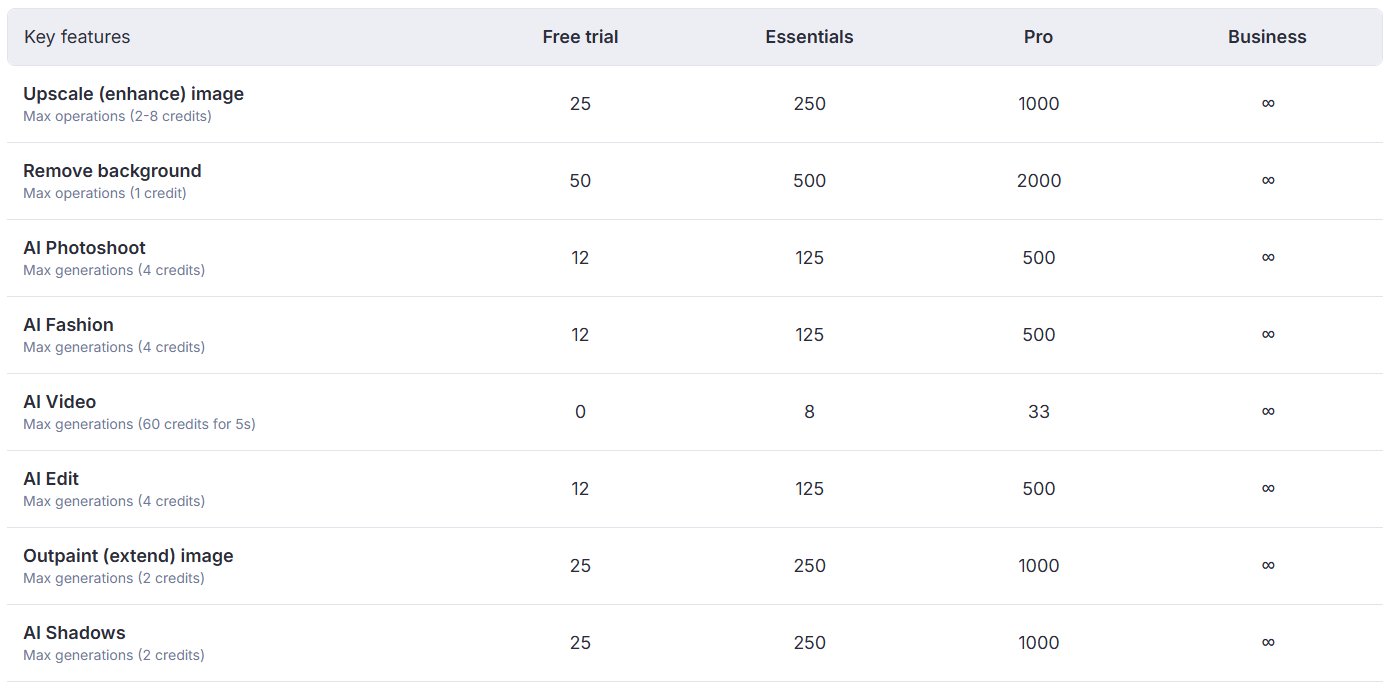
Its price list is detailed. Background removal is 1 credit per image; AI Photoshoot, AI Fashion and AI Edit are 4 credits each; outpainting and AI Shadows are 2 credits each. A 5-second AI video costs 60 credits. The free trial does not include AI video. The FAQ's example is that the Pro plan's 2,000 credits cover 500 standard-quality AI Photoshoots. Batch processing, priority queue and Brand Kit start at Pro, and output up to 4K is limited to Pro and Business. Export formats include Shopify products and Instagram stories.
Claid.ai suits stores that want to know what each image costs or have a developer who can integrate the API. If you only need to remove a few backgrounds, that level of pricing detail offers little benefit.
3. LubanAI
I judged LubanAI on the three things I cared about most when I used Photoroom: white-background images, a full set of product photos, and video ads.
For white-background images, start with the Background Remover. It handles up to 10 images at a time, each up to 10 MB, and exports transparent PNGs. It is free and needs no sign-up.
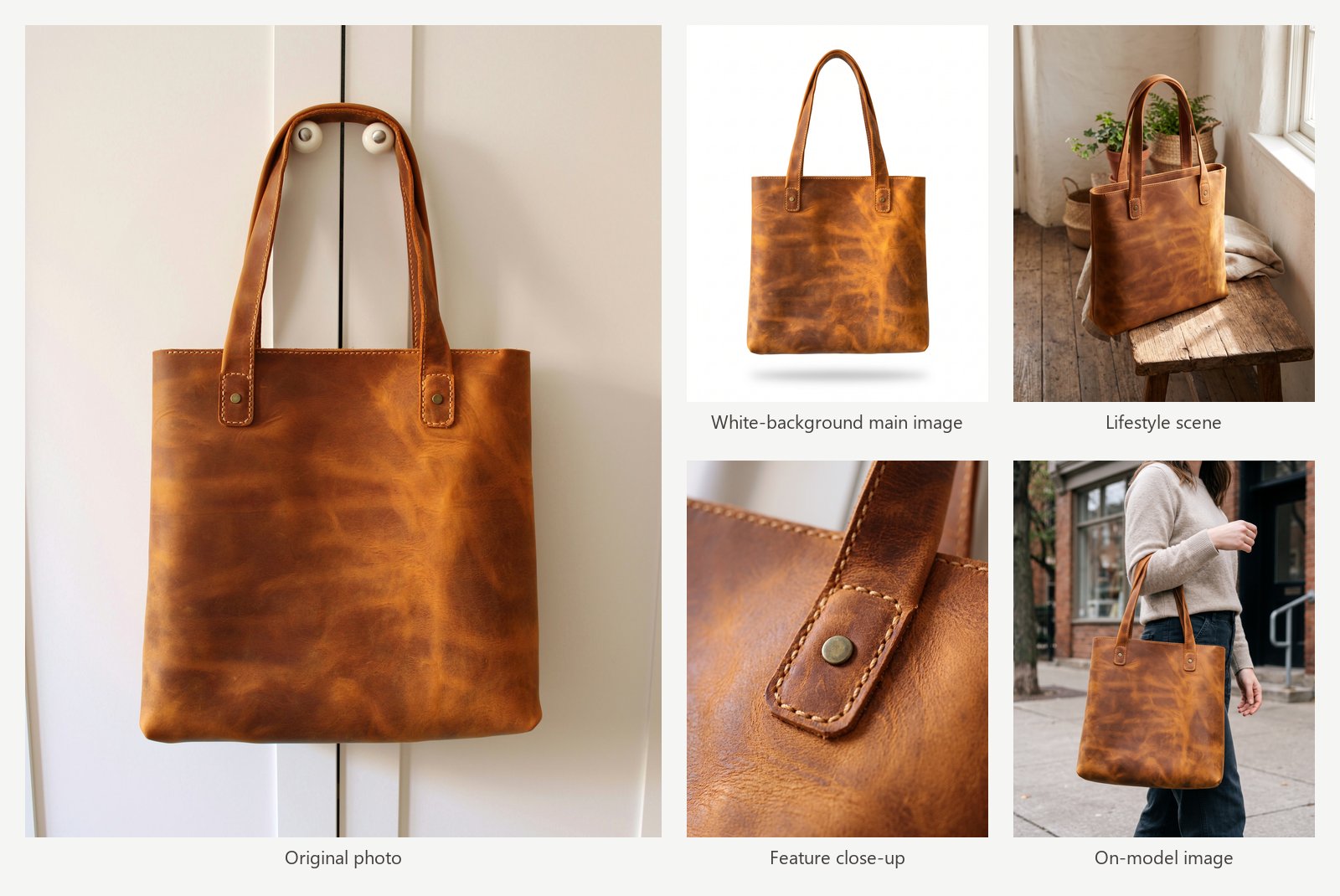
For a full set of listing images, I use the AI Product Photo Generator. It accepts 1 to 5 original product photos as references or pulls images from a product page link. You can select Amazon, Shopify, TikTok Shop or Etsy. The tool applies the selected platform's main image rules and recommends a resolution. You can choose up to 3 aspect ratios at once and get 1 to 4 images per ratio at resolutions up to 4K. The full set downloads as a single ZIP file. For new listings, I get the main image, lifestyle shots and vertical images for social media in one run. That saves me a separate round of exporting and cropping.
Video is the reason I left Photoroom. The AI UGC Video Generator turns one product photo into a 15-second vertical video with an AI presenter who holds the product and speaks to the camera. It generates the script automatically. Each video costs 220 credits. Photoroom's Video Ad Maker is available on Max and higher plans, while LubanAI charges per video.
On pricing, signed-in users without a subscription get 10 free credits a day. Credit packs start at $0.99 for 100 credits, and credits in packs never expire. For regular use, Plus costs $12.99/month for 1,500 credits, Pro costs $39.99/month for 5,000 credits, and Ultra costs $99.99/month for 15,000 credits. Annual billing costs less.
Photoroom and the alternatives side by side
In the platform integration and API rows, it means I did not find any mention of it on the official site.
| Photoroom | Pixelcut | Claid.ai | LubanAI | |
|---|---|---|---|---|
| Free use | Free plan (personal, non-commercial only); 7-day trial on Pro and Max annual | Free plan, limited cutouts and upscales | 50-credit trial | 10 credits a day; background removal free, no sign-up |
| Paid from | Pro $12.99/mo ($7.50/mo billed annually) | Pro $10/mo ($8/mo billed annually) | See pricing page | Credit pack $0.99; subscription $12.99/mo |
| Background removal | Yes, with Batch Edit | Unlimited from Pro | 1 credit per image | Free, up to 10 images at a time |
| AI product photos | AI Product Photography, AI Fashion Models | Third-party image models, paid in credits | AI Photoshoot, AI Fashion, 4 credits | Output follows platform rules, up to 3 aspect ratios at once |
| Video ads | From Max; 50 generations on Max, 150 on Ultra | Third-party video models, paid in credits | 60 credits per 5-second video | UGC talking-head video, 220 credits each |
| Platform integration | Shopify integration from Max; Marketplace Sync | Not shown | Exports in Shopify products format | Output follows Amazon, Shopify, TikTok Shop and Etsy rules |
| API | Yes, billed separately | Yes | Yes | Not shown |
When it makes sense to stay with Photoroom
If you are already on Max and use both video and the Shopify sync, there is no reason to switch. For features that connect to your store backend, such as Marketplace Sync and the Shopify integration, confirm that the new tool can connect before you move; if it cannot, you add a manual upload step. If you do most of your editing on your phone, the Photoroom and Pixelcut apps are easier to use than their web versions.
If you use Pro only for background removal and export well under 1,000 images a month, the decision mostly comes down to price. Compare the unlimited background removal Pixelcut offers on Pro and higher plans with LubanAI's free Background Remover. I wanted to add video without moving up a subscription tier, so I chose to pay per video.
FAQ
Is there a free version of Photoroom?
Yes. The help center says Photoroom has a Free plan, but its features and allowances are limited and it is for personal, non-commercial use only, so a store selling products needs a paid plan. Annual billing on Pro and Max also includes a 7-day free trial. If you only need free cutouts, Pixelcut's Free plan and LubanAI's Background Remover both work.
Can Photoroom's Pro plan make videos?
No. According to the pricing page, video starts at Max, with up to 50 generations on Max and 150 on Ultra.
Is there a Photoroom alternative that costs less?
It depends on volume. Pixelcut Pro includes unlimited background removal and costs the equivalent of $8/month when billed annually. LubanAI credit packs start at $0.99 and the credits do not expire, which suits stores whose volume varies from month to month.
P.S. If you are looking for a Photoroom alternative, are you trying to replace background removal, product photos or video? Contact LubanAI to share where you get stuck. That feedback helps LubanAI decide which features to prioritize.