Seedream 5.0 Flash AI Image Generator

ByteDance's fast Seedream model for product photos and edits at a lower credit price.

0 / 2000
Written by AI
Reference images require a premium model. Your selection is saved.
Parameters
Style
Aspect Ratio
Resolution
2K is plenty for web and storefront use. Pick 4K only for print or heavy cropping.
Quality
Background
Model
Model

Developed by ByteDance Have a product photo? Make listing images with Seedream 5.0 Flash

What Seedream 5.0 Flash can do

Cozy lifestyle scenes around your product

The Seedream 5.0 series builds warm tabletop scenes with soft light and natural props, like this candle, latte and pastry spread. Use it for lifestyle images and social posts that show a product in everyday use.

Cozy tabletop scene with a lit candle jar, latte-art coffee, a book titled "Seed" and a pastry, generated from hand-drawn sketch markings on a photo.
Source: ByteDance Seed / BytePlus ModelArk (Seedream 5.0 series)

Magazine-style posters with bold titles

The Seedream 5.0 series pairs a clear subject with a large headline in a magazine-cover layout, as in this poster of a puppy on a chair. Use it for campaign posters and store banners where the title has to stand out.
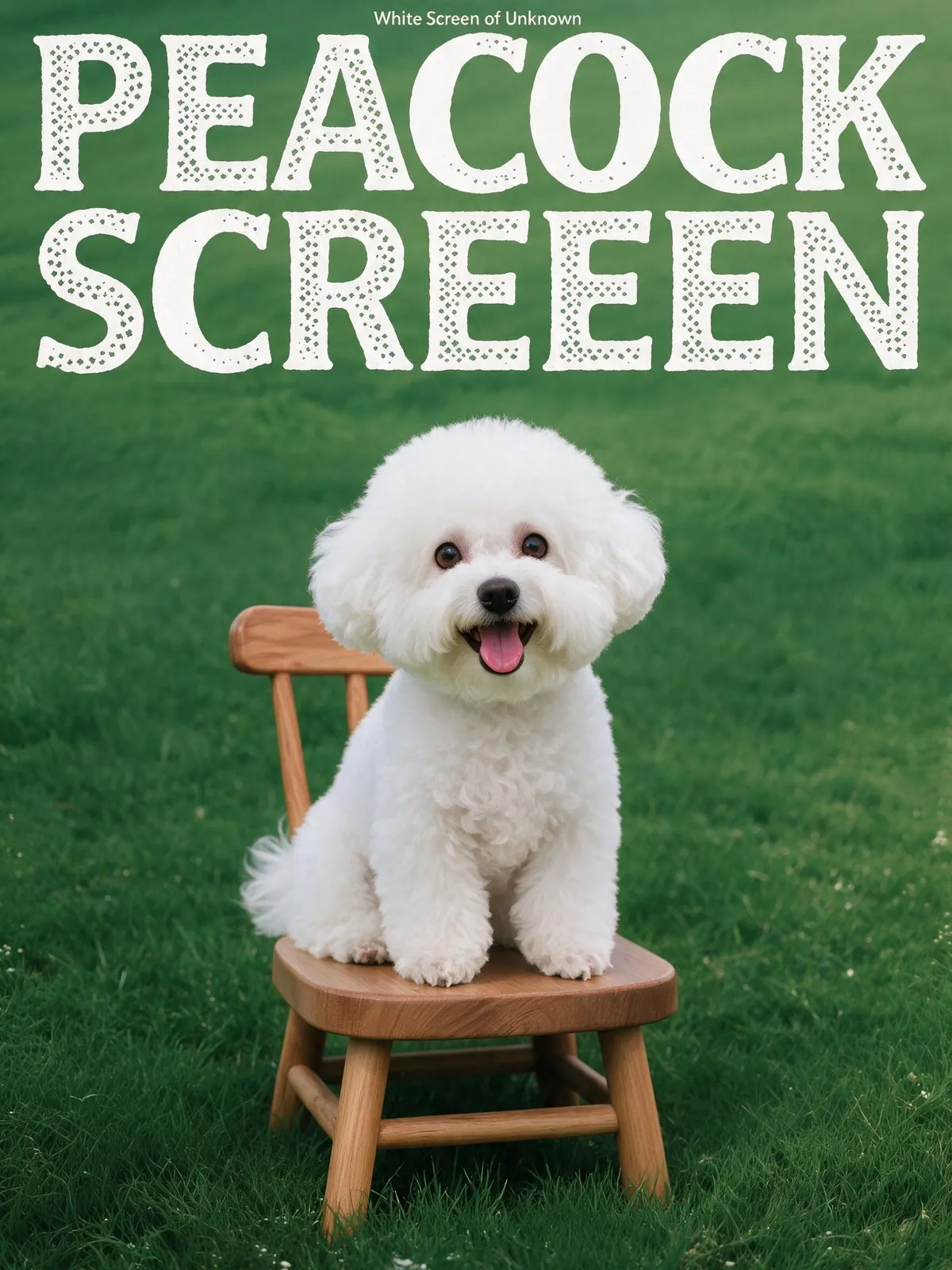
Green magazine-style poster titled "PEACOCK SCREEEN" where a white bichon puppy on a wooden chair has been placed into a bounding-box region.
Source: ByteDance Seed / BytePlus ModelArk (Seedream 5.0 series)

Text in many scripts in one image

The Seedream 5.0 series renders text natively in 14 languages beyond Chinese and English, including Arabic, Thai, Russian and Japanese, side by side in one image. Use it to produce listing images for several markets from the same design.

Speech bubble filled with greetings in many languages and scripts, including Arabic, Chinese, Japanese, Korean, Thai, Russian, Spanish and French.
Source: ByteDance Seed / BytePlus ModelArk (Seedream 5.0 series)

Clean podium backdrops for products

The Seedream 5.0 series can render an empty display podium in a styled setting, ready for a product to sit on. Use backdrops like this for hero shots and promo tiles that keep the focus on what you sell.

Base layer from an automatic layer decomposition: a sliced-wood product podium on grass in front of a teal draped backdrop.
Source: ByteDance Seed / BytePlus ModelArk (Seedream 5.0 series)

More official Seedream 5.0 Flash examples
Official examples on this page were published by ByteDance and remain the property of their owner. Click a source link to see the original.

Images made with Seedream 5.0 Flash

Model in a cream cardigan on a seaside terrace
Serum bottle on a rock by the sea
Poster for running shoes
Man in a navy suit at a cafe

What Seedream 5.0 Flash does well

Fast generation

Images typically finish in 10 to 40 seconds, suited to testing scenes and producing listing images in volume.

1K and 2K at one price

Both resolutions cost the same credits, so listing images and detail pages can go out at 2K.

Part of the product photo workspace

Use the prompt helper, aspect ratios and history of the AI product photo tool with this model.

Compare ByteDance models

Model Resolution Credits per image, from Key difference Best for
Seedream 5.0 Flash 1K / 2K 6 The fastest and lowest-priced Seedream Fast drafts and product images in volume
Seedream 5.0 Lite 2K / 4K 11 2K and 4K only, with optional web search 4K detail and current information
Seedream 5.0 Pro 1K / 2K 14 Top Seedream 5.0 tier for scenes and edits from your references, up to 2K Product scenes and edits
Seedream 4.5 2K / 4K 12 Previous generation, 2K and 4K output High-resolution product images

How to use Seedream 5.0 Flash

1

Open the workspace

Sign in and open the workspace from this page. Seedream 5.0 Flash is selected in the model menu.

2

Add references and describe

Upload product photos or reference images, then describe the image you want.

3

Generate and download

Choose the resolution, check the credit amount on the button, then generate and download.

Seedream 5.0 Flash credits per image

Resolution 1K 2K
Per image 6 6

Prices shown are per image. This model costs the same at every resolution, aspect ratio and number of reference images. The workspace shows the exact amount before you generate.


Seedream 5.0 Flash FAQ

Seedream 5.0 Flash is the fast image generation and editing model in the Seedream 5.0 series. On LubanAI it runs in the AI product photo workspace at 1K or 2K resolution and uses the fewest credits of the three Seedream 5.0 models, which suits drafts and large batches.

Three Seedream 5.0 models run in the AI product photo workspace. Seedream 5.0 Flash is the fast option and uses the fewest credits, at 1K or 2K. Seedream 5.0 Pro delivers richer detail for final listing images, at 1K or 2K. Seedream 5.0 Lite outputs at 2K or 4K and offers optional web search for current information.

Yes. Upload your product photo, add references for the model, pose, background or scene, up to 5 images in total, and describe the edit you want, such as a seasonal scene or a new setting. Because Flash returns results quickly, it suits trying several prompts on the same product before you pick a direction.

Yes. Set Count to the number of images you want. Turn on Photo set to give each image its own shot type, such as White background, Lifestyle scene or Material close-up, or leave it off to get variations of the same shot. Credits are charged per image, and the generate button shows the total before you submit.

You need a free LubanAI account and credits. Each Seedream 5.0 Flash generation uses credits, which you can add at any time through a subscription or a one-time credit pack whose credits never expire. No API key or separate account with the model developer is needed.

Signed-in users get 10 free credits every day, reset at midnight UTC. With a verified email, these daily credits can pay for Seedream 5.0 Flash at any resolution the balance covers. Accounts with a subscription or credit pack balance pay from that balance, and daily credits apply once it reaches zero. The generate button shows the exact cost before you submit.

Seedream 5.0 Flash costs 6 credits per image. 1K and 2K are the same price, and the aspect ratio and number of reference images do not change it. The exact amount appears on the generate button before you submit.

Yes. Images you create with this model can be used commercially, including in product listings, ads, store banners and social media posts. No attribution is required on paid plans or credit packs; free-plan outputs require attribution to LubanAI. See our Terms of Service for details.

Results can be downloaded for 30 days (7 days for free users). After that they are no longer available. Download the images you want to keep before they expire.

Seedream 5.0 Flash costs fewer credits and returns images faster, which suits drafts and large batches. Seedream 5.0 Pro is the higher-quality choice for final listing images.

Start creating with Seedream 5.0 Flash

We use cookies to improve your experience. See our Privacy Policy.