Pebblely Alternative for Clothing and Jewelry Sellers

My girlfriend's store carries a cropped gray hoodie. I uploaded a flat-lay photo of it to Pebblely. The tool quickly placed it on a wooden table beside a potted plant and added shadows and reflections automatically. The scene looked convincing. But the hoodie was still lying flat, so shoppers couldn't see how it would fit. That's often why clothing sellers look for a Pebblely alternative. Pebblely handles backgrounds well, but one listing needs more than a background. I used the same pair of earrings and the same hoodie in several tools to see which sellers each option would suit, starting with Pebblely itself.
Pebblely's features and plans (official site, November 2026)
The headline on the Pebblely site reads "Create AI product photos that help you sell more." The subheading reads "No Photoshop skills required." It does one focused job: you upload a product photo, the AI generates a background and adds shadows and reflections automatically. The listed features are 100+ templates, Bulk generation, Custom prompts, Reference images and output in multiple sizes, and the site says it has generated 25,000,000+ images.
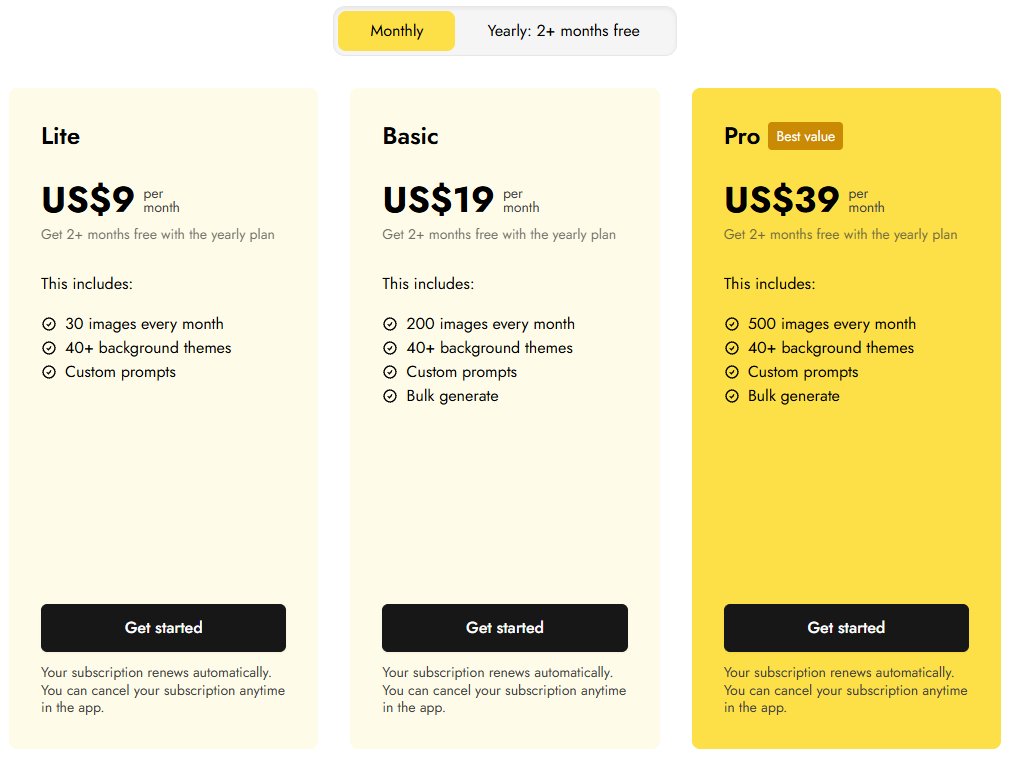
The table below shows Pebblely pricing for the three plans on monthly billing.
| Plan | Monthly price | Images per month | Bulk generation |
|---|---|---|---|
| Lite | US$9 | 30 | No |
| Basic | US$19 | 200 | Yes |
| Pro (marked Best value) | US$39 | 500 | Yes |
Lite includes 40+ background themes and custom prompts. For annual billing the site says "2+ months free," and the FAQ gives Basic at $179/year and Pro at $379/year, "Save up to 20%."
The FAQ states "we are not able to offer refunds," so I would start on monthly billing before deciding on an annual plan. Pebblely sends a reminder email 7 days before renewal, and the images you generate belong to you. The FAQ has a question about a free trial, but I did not see a clear answer, so check the official site to see whether a free plan is offered.
The cost per image
I compare plans by cost per image because each monthly fee covers a different number of images. Based on Pebblely's published allowances, Lite works out to about $0.30 per image, Basic about $0.095 and Pro about $0.078. That assumes you use the full allowance every month.
When I sold jewelry, I listed about 15 to 20 new styles a month and needed 4 to 6 photos for each. I usually used around 80 images a month. At that volume, Lite would fall short and I'd use less than half of Basic's allowance. For a small seller like me, whose image volume goes up and down, paying for images I wouldn't use in slower months would feel wasteful.
Where Pebblely does well, and where it falls short
I liked how the earrings turned out in Pebblely. The reflections on the metal and the tray's shadow looked natural. I'd use the photos on Instagram or in a banner on my own storefront. Pebblely does the job for products that keep their shape and rely on the setting for atmosphere, such as jewelry, home fragrance products and small decorative objects.
The hoodie is where I got stuck. Once clothing shoppers have seen the main image, they most want to see how the garment fits when worn. They look at where the shoulder seams sit, where the hem falls relative to the waist, and whether the sleeves bunch up. I checked Pebblely's pricing page and homepage and didn't see an option for virtual try-on or on-model photos. The pricing page didn't list a video tool either. The pages I checked mention only a web version. If you also need on-model clothing photos, or want a short product video for TikTok, the tools below are worth a look.
Choosing a Pebblely alternative for your store (4 options)
1. LubanAI
LubanAI (an AI toolkit for online sellers and creators) is what I use for new listings now.
For the hoodie, I ended up using AI Virtual Try-On. You upload 1 to 3 flat-lay photos or photos of the garment on a hanger. The tool shows the same AI model wearing the garment in up to 4 poses. The standard tier starts at 12 credits per pose. Because the same model wears the garment in every shot, the images in one listing do not look pieced together.
For products like the earrings that only need a new background, Background Changer does the same job as Pebblely. You can choose from 8 solid colors or 8 scene presets, or upload your own background. The tool adjusts the lighting and shadows to match the new background and preserves the product's shape, color, text and logo. It starts at 11 credits per image. Pebblely has the larger library, with 100+ templates.
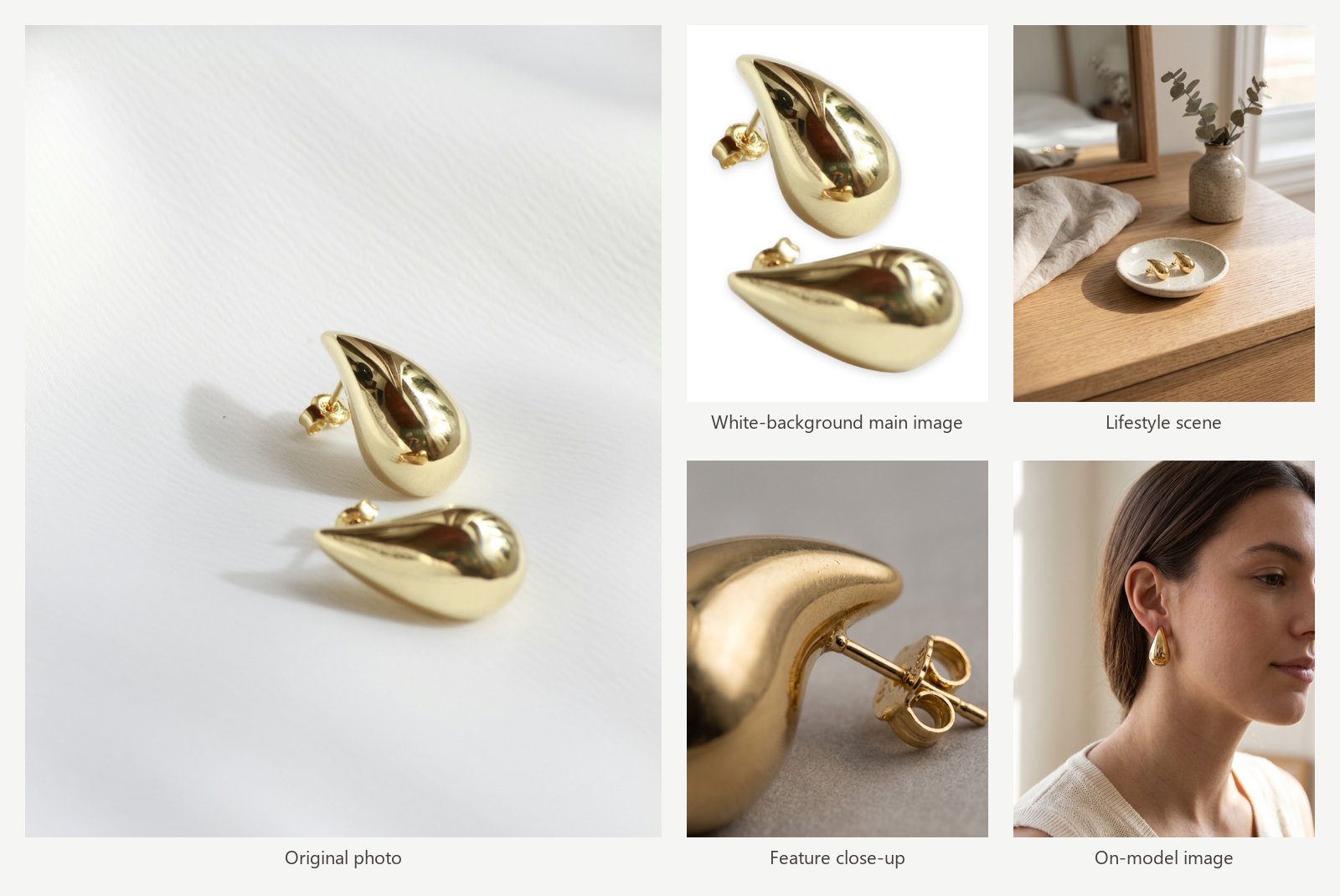
When I need a complete set of listing images, I use the AI Product Photo Generator. With Photo set turned on, you can select white-background shots, lifestyle shots, detail close-ups, on-model photos, texture close-ups and alternate angles. The tool generates a separate image for each selected shot type, all in the same aspect ratio. You can choose Amazon, Shopify, Etsy, TikTok Shop or another target platform. The generator uses the selected platform's main image conventions as a guide. You can choose up to 3 aspect ratios at once, with 1 to 4 images per ratio, up to 4K, and the whole set downloads as one ZIP. It starts at 7 credits per image.
On pricing, Plus is $12.99/month for 1,500 credits, Pro is $39.99/month for 5,000 credits, and Ultra is $99.99/month for 15,000 credits, with 30% off on annual billing. On Pro and Ultra, AI image generation and AI product photos that use the LubanAI model cost no credits and have no image cap in standard mode. If you would rather not subscribe, you can buy credit packs; the smallest is $0.99 for 100 credits, and pack credits never expire. If you sign in without a subscription, you get 10 free credits a day. You can use those credits to try generating a photo of one of your products before deciding whether to subscribe.
Pebblely Pro costs $39 a month for 500 background-swap images. LubanAI Pro costs $39.99 a month and includes unlimited product photos with the LubanAI model in standard mode, plus 5,000 credits for on-model photos, background changes or product videos.
2. Claid.ai
Claid.ai charges 1 credit for background removal, 4 each for AI Photoshoot and AI Fashion, 2 for AI Shadows, and 60 per 5 seconds of AI Video. The free trial includes 50 credits you can spend on any operation, plus 50 API credits. Allowances vary by plan. For AI Photoshoot, Essentials includes 125 uses per month and Pro includes 500.
Claid.ai suits sellers who need to upscale and retouch product photos in bulk. It also suits sellers with the technical skills to process an entire catalog through the API. It has a separate API pricing page.
3. Flair.ai
Flair.ai lets you train your own Custom Model so the same product stays consistent across different scenes. The free plan includes 1 Custom Model and 5 generated images. The pricing page lists Pro at $8/month. Pro+ is $26/month and includes 80 generated images, up to 8 standard Custom Models, and a commercial license for companies. Scale is $38/month for 150 images. The page has an annual discount toggle, so check which billing period is displayed before you check out.
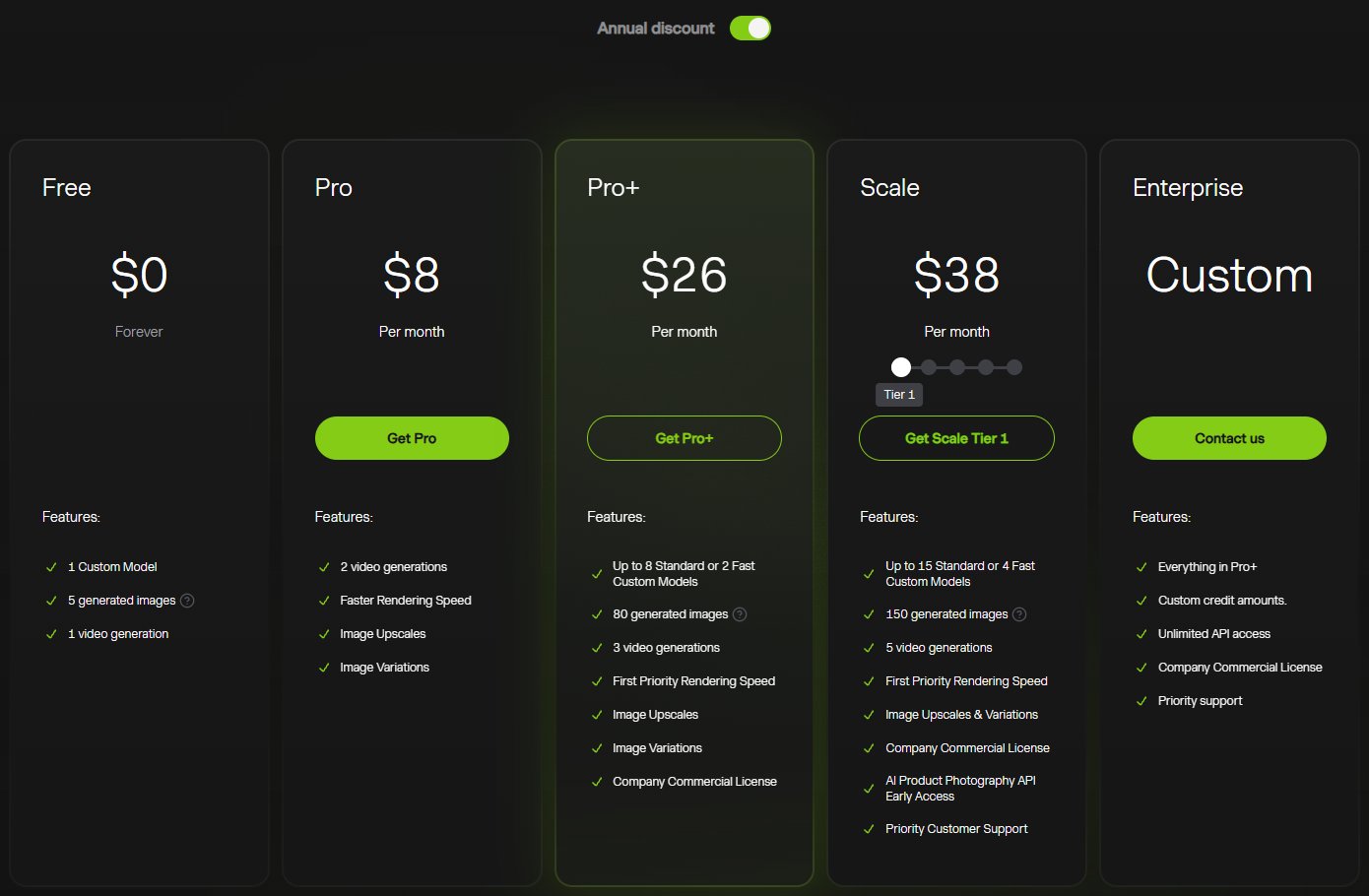
Flair suits sellers who are willing to spend time staging scenes and want a consistent brand look. According to the pricing page, each use of Instant image generation or Ad generation counts as 4 regular image generations toward the plan allowance.
4. Mokker
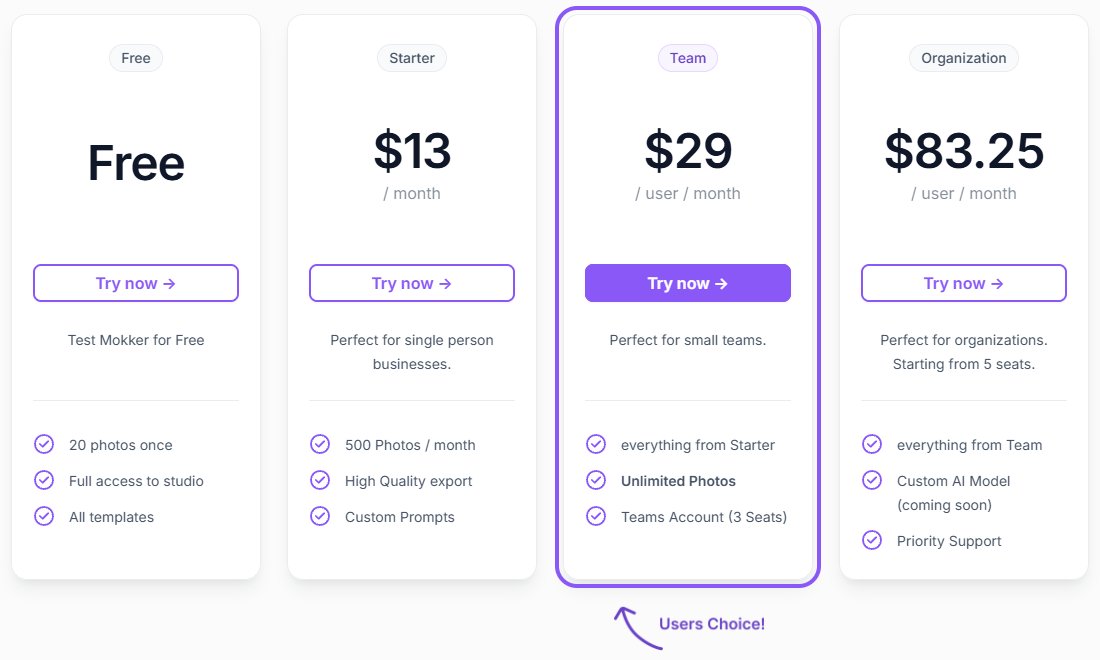
Mokker's pricing page now reads "Mokker AI is now soona's AI Studio." New users sign up through soona. The page lists a one-time free trial of 20 images. Starter costs $13/month for 500 images and includes Custom Prompts. Team costs $29 per user per month and includes unlimited images and 3 seats. The page also has an annual toggle (save up to 35%). Because the product is being migrated, confirm that soona's prices and features match this page before you sign up.
Pebblely and the alternatives in one table
| Tool | Best for | Free trial | Starting price | On-model photos | Product video |
|---|---|---|---|---|---|
| Pebblely | Jewelry, home fragrance and other products that rely on the background for mood | Not stated on the site | Lite $9/mo for 30 images | - | - |
| LubanAI | Clothing, jewelry and bags, when one SKU needs a full set | 10 credits a day for signed-in users without a subscription | Credit pack $0.99; Plus $12.99/mo | AI Virtual Try-On | AI Product Video |
| Claid.ai | Large volumes to retouch, or API workflows | 50 credits | See official site | AI Fashion (as named on the pricing page) | AI Video |
| Flair.ai | Training a custom model and staging scenes | 5 images | Pro $8/mo | - | Yes, counted per plan |
| Mokker | Large, steady monthly volumes of background swaps | 20 images, once | Starter $13/mo | - | - |
If I sold only jewelry, I'd choose between Pebblely and Background Changer based on which templates I liked. If your catalog includes clothing or you want to make a vertical product video, look for a Pebblely alternative that does more than change backgrounds.
P.S. What do you sell, and where are you stuck? Contact LubanAI with your product category to request a test run on your own products.