How to Do the Ali G Driving Scene AI Trend in One Photo
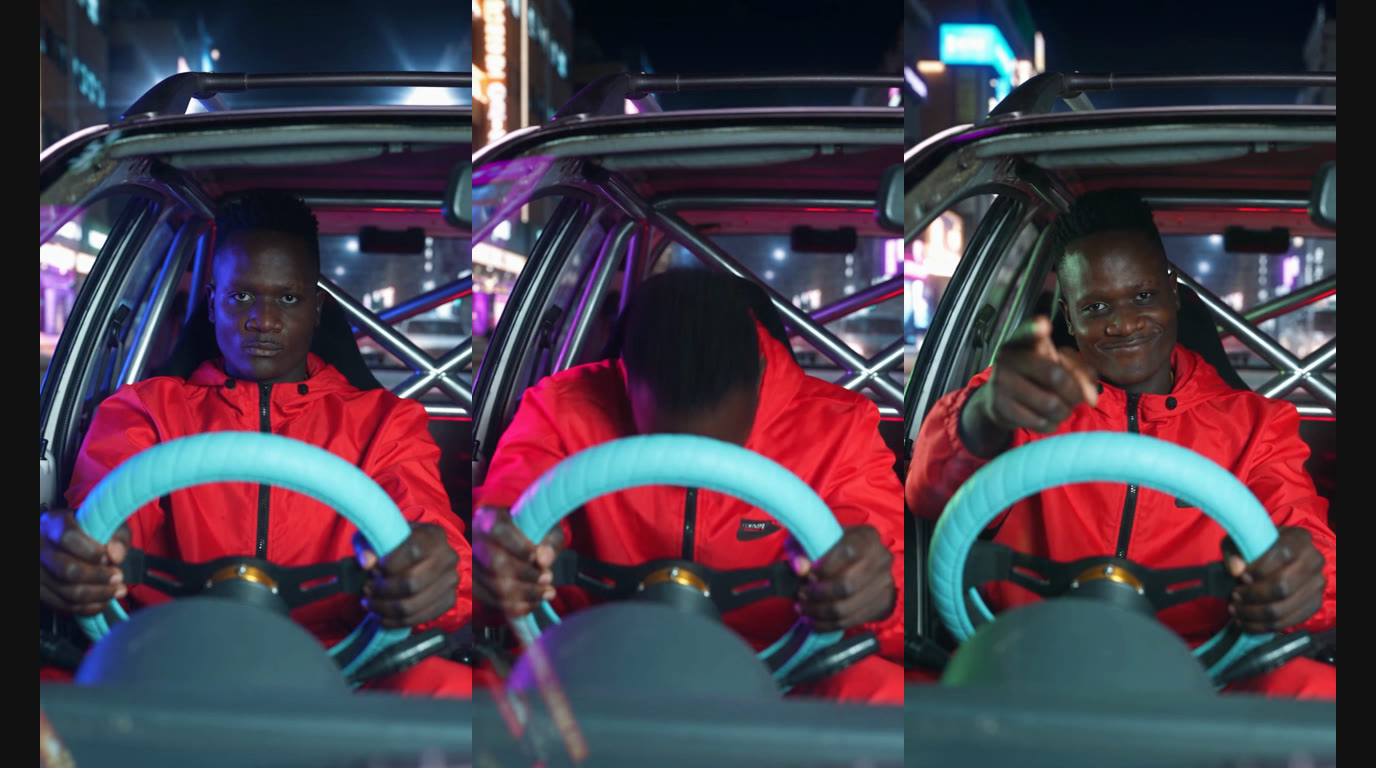
Picture a beat-up hatchback: a roll cage behind the seats, a thick light-blue padded wheel, and a driver whose face stays blank until the bass lands, when the head-banging starts. The Ali G driving scene AI trend generator on LubanAI, an AI toolkit, seats you there from a single photo showing your face. Upload that photo, press Generate video, and a vertical clip of 5 seconds comes back, ending on a smug grin with one finger pointed at the camera. No prompt has to be written, and there is nothing to edit afterward.
How to make yours in 3 steps
- Open the Ali G driving scene AI trend generator. Everything comes preset: the car, the light-blue wheel, the dashcam angle, the head-banging bit.
- Upload your photo. One picture of you, face and shoulders inside the frame, drops into the Your photo box. A selfie works, and so does a photo a friend took.
- Click Generate video. The file runs 5 seconds, 9:16, 720p, sized for Instagram Reels, TikTok and YouTube Shorts. Once rendering ends, the clip appears on that same page, ready to save and share.
Which photo works best
The camera looks back at you from the dashboard, close in, so any fault in the photo travels into the clip. What helps:
- Eyes on the lens. Straight-on framing, face and shoulders, looking right into the camera: that is what holds the likeness.
- Shoot in decent light. Daylight by a window, or any bright room, keeps features crisp.
- Sunglasses off. Hidden eyes hurt the likeness.
- Skip the beauty filters. Skin gets smoothed, faces get reshaped, and a tight shot shows every bit of it.
- Just one person in frame. A single face gives the tidiest take, and the car holds one driver anyway.
- Bright tracksuit, if you like (optional). A loud color gets nearer the original.
Where the Ali G car scene comes from
On March 22, 2002, Ali G Indahouse reached UK theaters, and the drive is the scene people still remember. Ali G's ride down a suburban street is a tired little hatchback with a roll cage behind the seats and a thick light-blue wheel. The track over it is "Incredible", by M-Beat featuring General Levy. That 1994 single was the first jungle record to make the UK top 10.
A repost on August 25, 2026, gave the clip a second run on TikTok, captioned "me omw to go pick up bro after getting my drivers license". Anyone who has driven across town for a friend saw themselves in it, and copies followed quickly. AI versions turned up on October 18, 2026, putting your face in that driver's seat from a single photo, days before Ali G: Who Iz I? hit UK theaters on October 23.
Caption ideas and ways to remix it
The clip lands one joke, the caption lands the other. Formats worth stealing:
- The classic: tag the friend and reuse the caption, "me omw to go pick up bro after getting my drivers license".
- Fresh license: put it up on test day, the moment you pass.
- Swap the trip: "Day one of the gym routine and I am driving there", "Off to the drive-thru at midnight", "Airport run, vacation starts now".
- Movie night: going to the new Ali G movie with friends? One clip each, all posted before you leave.
Grab the trending sound built around the Ali G drive from the TikTok or Instagram audio library, then time the bass drop to the first head-bang. Hashtags in circulation: #alig, #aligindahouse, #bluesteeringwheel.
Ali G driving scene prompt
Everything here is preset on LubanAI; a photo is all you add. For reference, a full prompt that spells the scene out element by element:
Vertical 9:16 comedy clip, 5 to 10 seconds, photorealistic, filmed like a single take from a music video.

Driver: the person from the uploaded photo, with the same face, hairstyle and skin tone in every frame. Outfit: a bright yellow tracksuit top and small tinted glasses (or keep the clothes from the photo).

Car: a tiny, worn 1980s-style three-door hatchback with a stripped-out cabin and a bare metal roll cage behind the seats. The driver holds a small, round, thick padded steering wheel in pale blue with both hands. No badges, logos or text anywhere on the car.

Camera: locked in front of the car, looking back at the driver through the windscreen, with the wipers resting at the bottom edge of the frame. The car rolls forward along a sunny suburban street of red-brick houses that slide past the side windows.

Action, timed to a fast 1990s jungle or drum and bass beat:
1. Opening seconds: the driver stares straight ahead with a blank, completely serious face while the beat builds.
2. Bass drop: sudden hard head-banging on every beat, deep nods from the neck, shoulders bouncing, both hands still gripping the pale-blue wheel.
3. Final second: the driver stops, lifts one hand from the wheel, points at the lens and breaks into a smug, pleased grin.

Keep the face sharp in the first and last moments. One driver only, natural hands with five fingers, no subtitles, no watermark.
Six details carry the recognition: the roll cage, a deadpan face, a squat light-blue wheel, a small old hatchback, the head-bang as the drop lands, and one last point at the lens. Get all six right and anyone scrolling knows the drive instantly.
What is the Ali G driving scene AI trend?
The trend rebuilds how the 2002 comedy Ali G Indahouse opens, and the setup is oddly exact: a beat-up hatchback, a cage bolted behind the seats, a squat pale-blue padded wheel, and a driver with a deadpan face until the bass lands, when the head-banging starts. Different posts call it different things, from the Ali G car scene to the blue steering wheel trend.
LubanAI sits you in the driver's seat and lifts the face straight from your photo. You start with a blank stare, move into hard head-banging, then finish with the smirk and a finger at the lens. The joke lives in the switch: dead serious for one beat, all-in head-banging for the next, all inside 5 seconds.
Shot for real, this needs a small hatchback, a padded wheel in that pale blue, a friend to hold the camera, and the ignition killed while you bang along. The generator already has the wheel, the car and the camera angle ready; only the photo is left to you.
Try it for yourself: open the Ali G driving scene AI trend generator, pick a picture of yourself, press Generate video. Need a generator for another trend? Tell us and we will see what we can do.
Ali G Indahouse and its character Ali G, created and played by Sacha Baron Cohen, appear here only to name the trend. LubanAI has no affiliation with the film, the people in it, or its studio, and the video uses your own photo, not the actor's likeness.




