How to Do the Elevator Walk Trend: Night Elevator Walk AI Video From One Photo
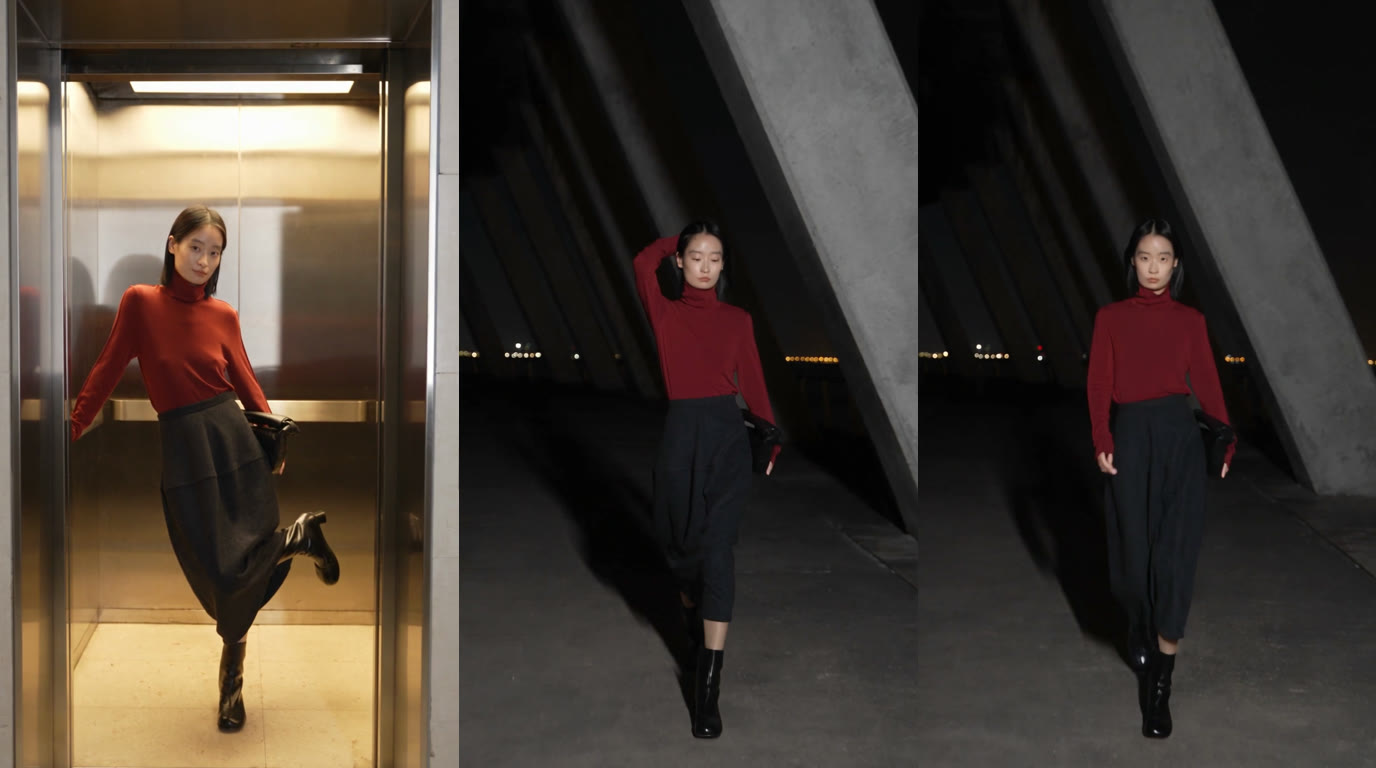
The doors are brushed steel, and they stay shut at first. Half a face shows in the gap. Then a figure steps into the night with purpose, and the camera flash freezes each footfall. That is the elevator walk trend, also called the Night Elevator Walk. A single full-body shot is all it takes: open the Night Elevator Walk generator, drop in the photo, and a 10-second vertical clip comes back, showing you step out of the elevator in the outfit you sent.
How to do the elevator walk trend in three steps
- Open the trend page. Elevator, night terrace, hard flash and camera work all come preset, so the setup is already done.
- Upload one full-body picture. A single person, framed from head to feet, looking into the lens, wearing the outfit you mean to put on display.
- Generate, then download. A progress readout runs on that page while the render finishes. You end up with 10 seconds of 720p footage at 9:16, cut for TikTok, Instagram Reels and YouTube Shorts.
What the Night Elevator Walk is
Picture a catwalk whose backstage entrance happens to be an elevator. Three beats carry the clip:
- The reveal. The brushed stainless-steel doors sit closed, then part just enough for half a face to appear, and then slide all the way open on a compact, warm-lit cab. The model rests a hand on the door frame, leans sideways and lifts one knee in a playful pose.
- Stepping out. A small red number glows above the doorway as the model steps out of the elevator and heads for the camera.
- The night walk. The terrace opens to the sky and is dark, with slanted square pillars of gray concrete; a narrow string of city lights glimmers faintly on the skyline. The camera retreats in front of the model, who keeps a runway stride going, sweeps a hand through the hair, throws a glance back over a shoulder and finishes facing the lens.
Light does the work here. One harsh flash mounted on the camera leaves the model crisp and bright while everything behind sinks to near-black, apart from a narrow row of distant lights on the skyline. It reads like a fashion-week street photo that has begun to move.
Why it works for showing off an outfit
Here the outfit from your photo is the whole point. Face, hair, clothes, footwear and accessories carry over from the upload, which turns the video into a compact runway spot for that day's look.
The elevator walk suits a handful of cases:
- A night out. The fit you pick for a dinner, a party or a late evening in town.
- A fresh purchase. A leather jacket, a statement dress or a long coat, straight out of the package.
- Footwear. Filming runs the full height of the body, so boots, sneakers and heels each get their moment.
- Small shops and stylists. A moving look-book, with no venue to rent and no team to hire.
Which photo works best
The clip covers you head to toe and happens mostly after dark, which puts real weight on the photo:
- Whole body, one person only. Frame yourself from crown to sole, shoes inside the shot, the entire outfit visible.
- Face the lens and stand square. Arms loose and posture straight give the cleanest read of both face and clothes.
- Light the face before you shoot. Night and flash own the scene, so stand near a window during the day, or in any evenly lit room; features stay legible even as the background goes black.
- Show the garments as they are. Belts, jewelry and bags too: the walk reproduces exactly what the photo shows.
- Leave the face clear. No sunglasses, no hat brim pulled low, no strand falling over the eyes; the head turns need an unobstructed reference.
- Send a sharp file. Full resolution straight from a phone wins over a screenshot or anything already squeezed down.
Styling ideas that look good under a flash
Contrast and texture pay off in front of a direct flash. Combinations that hold up in the dark:
- Black plus one highlight. An all-black look broken by patent shoes, a metallic bag or a satin top picks up the flash and separates from the night.
- Pale tones. Under the flash, white, cream and light-wash denim all brighten, and the figure separates from the backdrop.
- Something that swings. Loose hair, a long coat or a flowing skirt puts motion into each step and into the glance back over the shoulder.
- Uncluttered shapes. On a narrow vertical frame, clean silhouettes read better than dense prints.
Copy the Night Elevator Walk AI prompt
Building the same scene elsewhere, in a different AI video tool? The prompt below holds on to each beat that gives the clip its signature look. Wherever it says "my photo", put in whatever name that tool gives its reference picture.
Create a 10-second vertical (9:16) night fashion video starring the person in my photo.
Identity: same face, hair, skin tone and build throughout. Wardrobe comes straight from the photo; reproduce the same clothes, shoes and accessories without restyling.
Look: candid street-style footage from a handheld wide lens with a hard flash mounted on the camera, so the subject pops bright while everything behind falls almost black.
Scene 1 (0-2.5 s): brushed stainless-steel elevator doors, shut. They part slightly, half of the subject's face peeks through the gap, then they slide wide open. Inside the warm-lit metal car, the subject braces one hand against the elevator door frame, leans sideways and raises one leg in a model pose.
Scene 2 (2.5-4.5 s): the subject walks out of the lift toward us; a red floor number glows above the elevator doorway.
Scene 3 (4.5-10 s, hold until the end): an open-air concrete terrace after dark, with angled grey concrete pillars of square cross-section and a faint strip of far-off city lights along the skyline. The camera moves backward in front of the subject. The subject walks confidently toward it with a model's stride, swings their arms, sweeps one hand through their hair, glances back over one shoulder, then looks directly into the lens.
Avoid: extra people, outfit changes, on-screen text, logos, watermarks.
If the prompt feels like extra work, the Night Elevator Walk generator ships the scene prebuilt, and a single photo completes it.
Posting tips
- Write the caption about the clothes. The walk speaks for itself, so let the caption name the outfit or the plan for the night: "Friday fit, elevator edition."
- Lead with the reveal. The first two seconds carry the hook, with half a face showing through the gap in the doors, so keep large text away from there.
- Tag the trend. Outfit walk, elevator trend and elevator walk tags put the clip in front of an audience that already follows the format.
- Turn it into a series. One photo per outfit, and the same elevator then supplies a whole week of posts.
One photo stands between you and a walk of your own. Make a Night Elevator Walk video, save the file, and post the reveal.




