How to Do the Rugrats Filter AI Trend Without CapCut
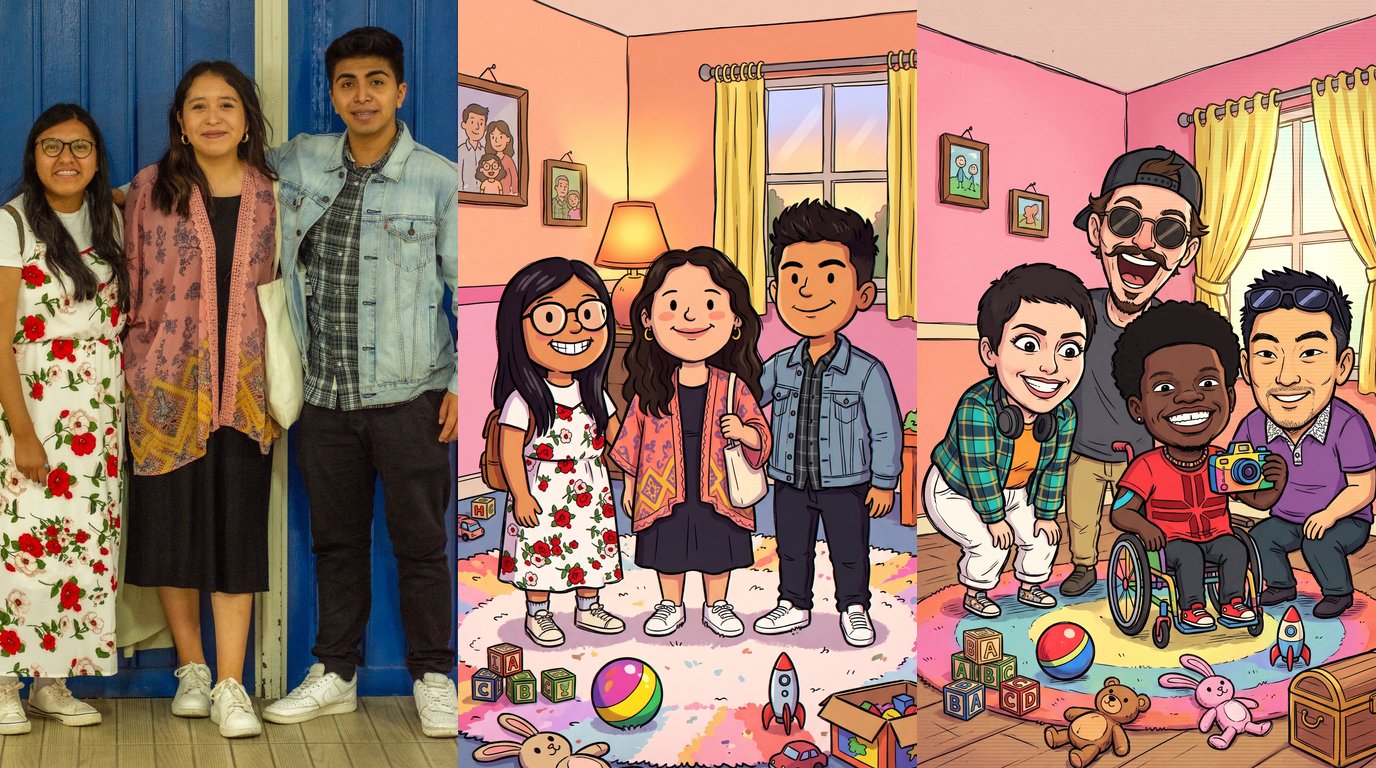
Oversized round heads, wobbly black outlines and a pink playroom scattered with alphabet blocks make up the look of the Rugrats filter AI trend, which turns a group photo into a hand-drawn still from a 90s Saturday-morning cartoon. Couples, friend groups and entire families post the result beside the original shot. On TikTok, one popular route is a CapCut template. The Rugrats filter generator needs just one photo, and the finished cartoon is ready to download.
Every person gets redrawn from head to shoe with a giant round head perched on a squat, chubby frame, while pose, hair, glasses and clothing colors stay put. Hands that were empty can end up gripping a rattle, a toy car or a baby bottle.
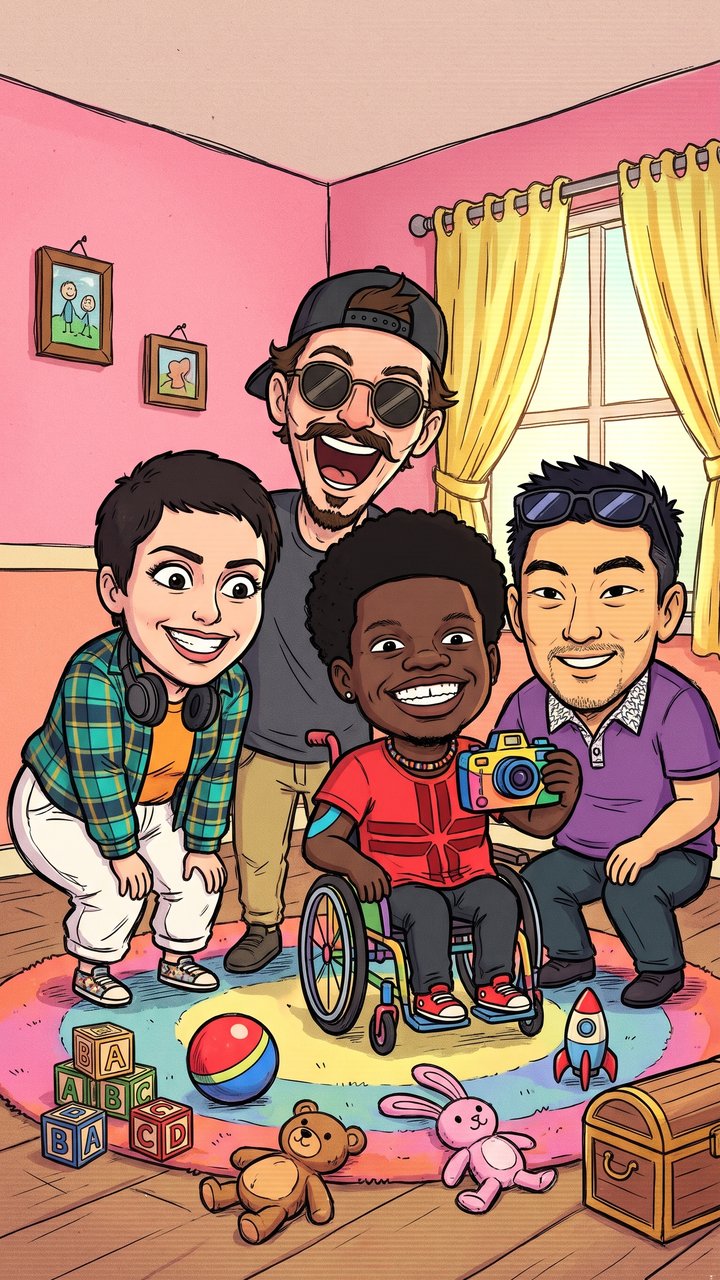
How to do the Rugrats filter AI trend without CapCut
- Open the trend page. Cartoon style, playroom and the 9:16 frame come already configured.
- Upload one photo. Best results come from a family or group shot with 2 to 6 faces; a lone selfie or a picture of your pet is fine as well.
- Generate the cartoon and download it. The result is a single vertical 2K image for Reels, Stories and TikTok.
Choose a clear photo for the Rugrats filter
The more clearly a picture shows every face, every hairstyle and every outfit, the more recognizable the cartoon turns out.
- Every face in frame. Pick a shot where nobody's face is cut off or hidden.
- Clean, even light. Soft illumination preserves hair color, glasses and each outfit's palette.
- Choose the pose you want in the cartoon. Peace signs, hugs, piggybacks and drinks in hand all carry over, left to right in the original order.
- Bring the pets. A cat or a dog shown whole comes back as a cartoon animal with its own coat colors and markings.
- Accessories carry the likeness. Caps, headphones, shades, earrings and tattoos get flattened into simple shapes, and they are usually what lets friends name each character at a glance.
Stick to your own pictures, or ones your friends have cleared.
Where the Rugrats filter trend came from
The label predates the present wave. An AI post that reimagined the Rugrats cast as real people cleared 5 million TikTok views in February 2024, and a baby-face effect showed up on TikTok under #rugratsfilter in May 2024.
The version people post now uses a CapCut AI template. The audio behind it first went up on October 2, 2026; by November 1 it had reached 1,488 TikTok videos. On October 9, a Fresno friend group posted a 90s playroom cartoon of themselves, and on October 31 several US tutorial accounts published walkthroughs for the Rugrats cartoon trend.
The prompt below spells out that style in plain language, so you can rebuild the look and the playroom around your own picture.
What stays and what turns into a cartoon
| Stays from your photo | Becomes 90s cartoon |
|---|---|
| Who is in it, in the same left-to-right order | Faces: flat, hand-drawn, with big simple eyes |
| Poses, gestures, expressions and anything held | Bodies: drawn head to toe, big round heads on small, chubby bodies |
| Hairstyle, hair color, beards, glasses, caps | Lines: thick black outlines with a slight wobble |
| Outfit colors and prints, jewelry, tattoos, skin tone | Colors: flat, bright and a little faded, like an old TV |
| Pets, in their own spot | The room: a pastel playroom with blocks and toys |
Copy the Rugrats filter AI prompt
The prompt also works in other image tools that take a reference picture. Attach the photo, then paste:
Turn my attached photo into a single frame of a late-1990s American hand-drawn TV cartoon, the kind of Saturday-morning show about toddlers and their families.
Style: thick black ink outlines that wobble a little, flat bright colors with one simple shadow tone, a slightly faded old-TV look, scratchy hand-drawn line work. Every character, adults included, gets an oversized round head (about a third of their height) on a small, chubby, toddler-like body with stubby arms and legs, big simple eyes, a tiny nose and a simple mouth. All faces are flat cartoon faces, never photo faces.
People: draw exactly as many characters as there are people in my photo, in the same left-to-right order and the same spots. Keep each person's pose, gesture, hand position and facial expression, including peace signs and hugs, and keep anything held in their hands, such as a drink or a phone. Keep what makes each person recognizable, simplified into cartoon shapes: hairstyle, hair length and color, beard or stubble, glasses or sunglasses, caps and hats, headphones, earrings, necklaces, tattoos, freckles, skin tone, apparent age and gender, and every outfit in its exact colors and prints. Never merge two people, swap features between them, or add or drop anyone.
Pets: any dog or cat in the photo becomes a cartoon animal in the same style, with its own fur colors, markings, ears and collar, in its own spot.
Background, in the same flat cartoon style: a cozy retro 1990s playroom and family living room with pastel pink and peach walls, a couple of framed pictures, a big window with yellow curtains, a soft rug, and toys on the floor: wooden alphabet blocks, a ball, stuffed animals, a toy rocket and a small toy chest.
Format: vertical 9:16, pulled back so the room shows and every character is drawn whole from head to shoes, even if my photo crops them. Empty hands can hold a baby bottle, a rattle or a toy car.
Avoid: added captions, titles, logos, watermarks or borders (letters on the alphabet blocks and lettering already on clothes are fine); existing cartoon characters; a green toy dinosaur; realistic skin or photo lighting.
Skip the setup entirely by uploading to the Rugrats filter generator, where the look is preloaded.
Ways to play with the Rugrats filter
- Before and after: put the real photo up first, then the cartoon, or set them next to each other.
- The family edition: parents, children and grandparents together make the playroom feel like it belongs.
- Couples: a picture of you both turns into a cartoon still that works as a shared avatar.
- Your pet's debut: a picture of the dog or cat on its own turns into a cartoon pet parked on that rug.
- Guess who: show only the cartoon and let followers pair each character with a friend.
Caption ideas for your Rugrats filter photo
- "Which one of us would get in the most trouble?"
- "Saturday-morning cartoon, starring us."
- "Tag yourself in the playroom."
- "Our friend group, 90s cartoon edition."
Turn a single photo into your Rugrats filter cartoon, download it and post it beside the original.




